
Lifted Transforms and High-Level Optimizers#
In the previous tutorial, we learned about the functional API with explicit state management using graph operations. While powerful, that approach requires manual state handling. This tutorial introduces lifted transforms - a higher-level API that automatically manages states while preserving JAX’s functional programming benefits.
Learning Objectives#
By the end of this tutorial, you will:
Understand the difference between functional API and lifted transforms
Use BrainTools optimizers for automatic state management
Leverage
brainstate.transformfor state-aware JAX transformationsBuild cleaner training loops with less boilerplate code
Apply the lifted API to the same polynomial regression problem
Setup and Imports#
import jax
import jax.numpy as jnp
import matplotlib.pyplot as plt
import numpy as np

import brainstate
import braintools

# Set random seed for reproducibility
np.random.seed(42)
The Same Problem: Polynomial Regression#
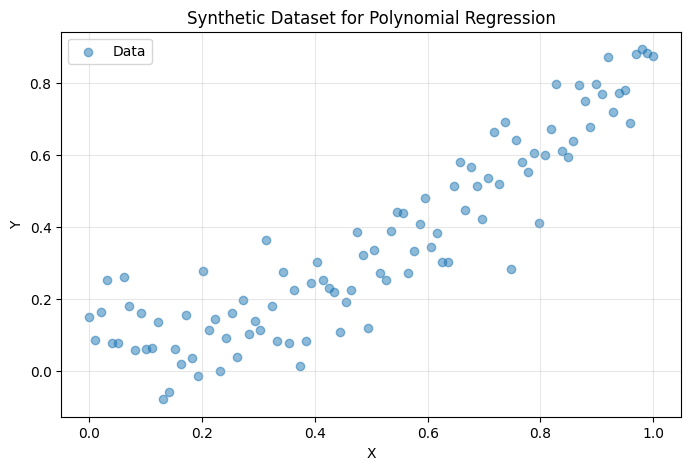
We’ll use the same dataset as the previous tutorial to highlight the differences in approach:
# Generate synthetic data: y = 0.8 * x^2 + 0.1 + noise
X = np.linspace(0, 1, 100)[:, None]
Y = 0.8 * X ** 2 + 0.1 + np.random.normal(0, 0.1, size=X.shape)

def dataset(batch_size):
    """Generator that yields random batches from the dataset."""
    while True:
        idx = np.random.choice(len(X), size=batch_size)
        yield X[idx], Y[idx]

# Visualize the data
plt.figure(figsize=(8, 5))
plt.scatter(X, Y, alpha=0.5, label='Data')
plt.xlabel('X')
plt.ylabel('Y')
plt.title('Synthetic Dataset for Polynomial Regression')
plt.legend()
plt.grid(True, alpha=0.3)
plt.show()
Building the Model with Lifted Transforms#
Step 1: Define the Model Components#
The model definition is similar, but we’ll use it differently:
class Linear(brainstate.nn.Module):
    """A simple linear layer: y = x @ w + b"""

    def __init__(self, din: int, dout: int):
        super().__init__()
        self.w = brainstate.ParamState(brainstate.random.rand(din, dout))
        self.b = brainstate.ParamState(jnp.zeros((dout,)))

    def __call__(self, x):
        return x @ self.w.value + self.b.value


class Count(brainstate.State):
    """Custom state type for tracking function calls."""
    pass


class MLP(brainstate.nn.Module):
    """Multi-layer perceptron with call counting.

    Note: Now inherits from nn.Module instead of graph.Node.
    This enables automatic state management.
    """

    def __init__(self, din, dhidden, dout):
        super().__init__()  # Important: call parent __init__

        self.count = Count(jnp.array(0))
        self.linear1 = Linear(din, dhidden)
        self.linear2 = Linear(dhidden, dout)

    def __call__(self, x):
        self.count.value += 1
        x = self.linear1(x)
        x = jax.nn.relu(x)
        x = self.linear2(x)
        return x
Step 2: Create Model and Optimizer#
Now we create the model and use a BrainTools optimizer that automatically manages parameter states:
# Create the model
model = MLP(din=1, dhidden=32, dout=1)

# Create optimizer and register trainable weights
optimizer = braintools.optim.SGD(lr=1e-3)
optimizer.register_trainable_weights(model.states(brainstate.ParamState))

print("Model created:")
print(model)
print("\nOptimizer registered with parameters:")
print(jax.tree.map(jnp.shape, optimizer.param_states.to_pytree()))
Model created:
MLP(
  count=Count(
    value=ShapedArray(int32[], weak_type=True)
  ),
  linear1=Linear(
    w=ParamState(
      value=ShapedArray(float32[1,32])
    ),
    b=ParamState(
      value=ShapedArray(float32[32])
    )
  ),
  linear2=Linear(
    w=ParamState(
      value=ShapedArray(float32[32,1])
    ),
    b=ParamState(
      value=ShapedArray(float32[1])
    )
  )
)

Optimizer registered with parameters:
{('linear1', 'b'): (), ('linear1', 'w'): (), ('linear2', 'b'): (), ('linear2', 'w'): ()}
Key Differences from Functional API:
No Manual State Splitting: We don’t need to call
treefy_split- the model and optimizer manage states internallyOptimizer Handles Parameters: The optimizer automatically tracks and updates parameters
Simpler Code: Less boilerplate, more readable
Training with Lifted Transforms#
Understanding Lifted Transforms#
Lifted transforms automatically handle state management:
brainstate.transform.jit: JIT compilation with automatic state threadingbrainstate.transform.grad: Gradients with automatic state differentiationStates are implicitly updated during function execution
Step 1: Define Training Step#
@brainstate.transform.jit
def train_step(batch):
    """Perform one training step.

    Notice how much simpler this is compared to the functional API!
    No need to pass/return states explicitly.
    """
    x, y = batch

    def loss_fn():
        # Simply call the model - states are managed automatically
        return jnp.mean((y - model(x)) ** 2)

    # Compute gradients
    # The grad transform knows which states to differentiate
    grads = brainstate.transform.grad(
        loss_fn,
        optimizer.param_states.to_pytree()
    )()

    # Update parameters using the optimizer
    optimizer.update(grads)
Compare with Functional API:
Functional API (previous tutorial):
def train_step(params, counts, batch):
    x, y = batch
    def loss_fn(params):
        model = brainstate.graph.treefy_merge(graphdef, params, counts)
        y_pred = model(x)
        new_counts = brainstate.graph.treefy_states(model, Count)
        loss = jnp.mean((y - y_pred) ** 2)
        return loss, new_counts
    grad, counts = jax.grad(loss_fn, has_aux=True)(params)
    params = jax.tree.map(lambda w, g: w - 0.1 * g, params, grad)
    return params, counts
Lifted API (this tutorial):
def train_step(batch):
    x, y = batch
    def loss_fn():
        return jnp.mean((y - model(x)) ** 2)
    grads = brainstate.transform.grad(loss_fn, optimizer.param_states.to_pytree())()
    optimizer.update(grads)
Much cleaner!
Step 2: Define Evaluation Step#
@brainstate.transform.jit
def eval_step(batch):
    """Evaluate the model on a batch."""
    x, y = batch
    y_pred = model(x)
    loss = jnp.mean((y - y_pred) ** 2)
    return {'loss': loss}
Step 3: Run Training#
# Training parameters
total_steps = 10_000

# Training loop - notice how clean this is!
print("Training the model...\n")
for step, batch in enumerate(dataset(32)):
    # Simply call train_step - no state management needed!
    train_step(batch)

    # Log progress every 1000 steps
    if step % 1000 == 0:
        logs = eval_step((X, Y))
        print(f"Step: {step:5d}, Loss: {logs['loss']:.6f}")

    # Stop after total_steps
    if step >= total_steps - 1:
        break

print("\nTraining complete!")
Training the model...

Step:     0, Loss: 17.077118
Step:  1000, Loss: 0.050319
Step:  2000, Loss: 0.018055
Step:  3000, Loss: 0.010365
Step:  4000, Loss: 0.008487
Step:  5000, Loss: 0.007985
Step:  6000, Loss: 0.007841
Step:  7000, Loss: 0.007793
Step:  8000, Loss: 0.007769
Step:  9000, Loss: 0.007754

Training complete!
Compare Training Loops:
Functional API:
for step, batch in enumerate(dataset(32)):
    params_, counts_ = train_step(params_, counts_, batch)  # Manual state threading
    if step % 1000 == 0:
        logs = eval_step(params_, counts_, (X, Y))  # Pass states explicitly
Lifted API:
for step, batch in enumerate(dataset(32)):
    train_step(batch)  # States handled automatically
    if step % 1000 == 0:
        logs = eval_step((X, Y))  # No state arguments needed
Analyzing Results#
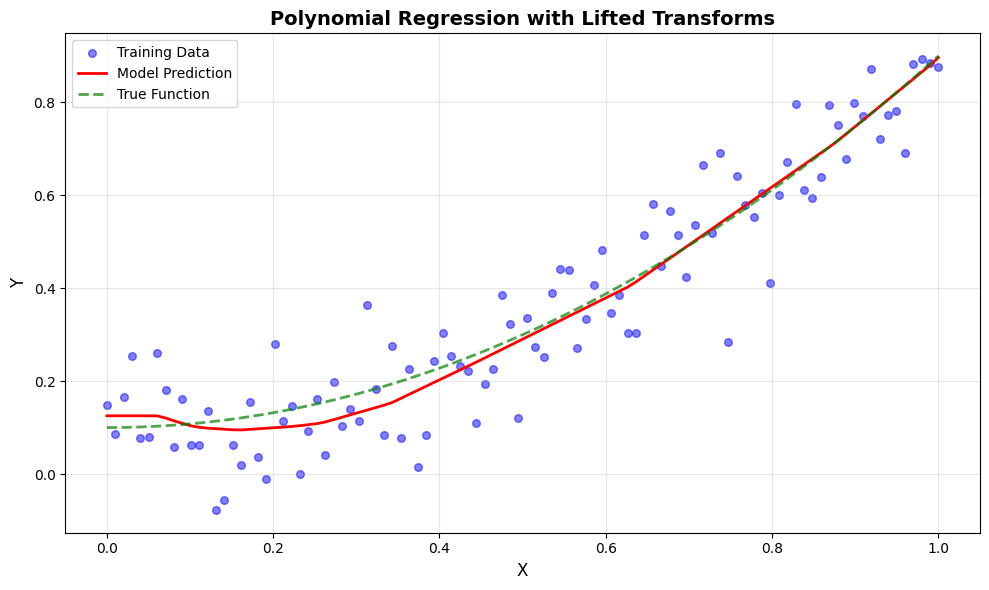
# The model already contains the trained parameters!
# No need to merge states like in functional API

print(f"Total model calls during training: {model.count.value}")

# Make predictions
y_pred = model(X)

print(f"Final predictions shape: {y_pred.shape}")
Total model calls during training: 10010
Final predictions shape: (100, 1)
Visualize Predictions#
plt.figure(figsize=(10, 6))

# Plot data points
plt.scatter(X, Y, color='blue', alpha=0.5, label='Training Data', s=30)

# Plot predictions
plt.plot(X, y_pred, color='red', linewidth=2, label='Model Prediction')

# Plot true function
X_true = np.linspace(0, 1, 100)[:, None]
Y_true = 0.8 * X_true ** 2 + 0.1
plt.plot(X_true, Y_true, color='green', linewidth=2,
         linestyle='--', label='True Function', alpha=0.7)

plt.xlabel('X', fontsize=12)
plt.ylabel('Y', fontsize=12)
plt.title('Polynomial Regression with Lifted Transforms', fontsize=14, fontweight='bold')
plt.legend(fontsize=10)
plt.grid(True, alpha=0.3)
plt.tight_layout()
plt.show()
Advanced: Using Different Optimizers#
BrainTools provides many optimizers. Let’s try Adam optimizer with learning rate scheduling:
# Create a new model
brainstate.random.seed(0)
model_adam = MLP(din=1, dhidden=32, dout=1)

# Create Adam optimizer with exponential decay learning rate
lr_schedule = braintools.optim.ExponentialDecayLR(
    1e-2,           # Initial learning rate
    decay_steps=100,   # Decay every 100 steps
    decay_rate=0.99    # Multiply by 0.99 each decay
)

optimizer_adam = braintools.optim.Adam(lr=lr_schedule)
optimizer_adam.register_trainable_weights(model_adam.states(brainstate.ParamState))

print("Adam optimizer created with learning rate scheduling!")
Adam optimizer created with learning rate scheduling!
# Define training step with the new optimizer
@brainstate.transform.jit
def train_step_adam(batch):
    x, y = batch

    def loss_fn():
        return jnp.mean((y - model_adam(x)) ** 2)

    grads = brainstate.transform.grad(
        loss_fn,
        optimizer_adam.param_states.to_pytree()
    )()

    optimizer_adam.update(grads)

@brainstate.transform.jit
def eval_step_adam(batch):
    x, y = batch
    y_pred = model_adam(x)
    loss = jnp.mean((y - y_pred) ** 2)
    return {'loss': loss}
# Training with Adam
total_steps = 5_000

print("Training with Adam optimizer...\n")
for step, batch in enumerate(dataset(32)):
    train_step_adam(batch)

    if step % 500 == 0:
        logs = eval_step_adam((X, Y))
        current_lr = optimizer_adam.current_lr
        print(f"Step: {step:5d}, Loss: {logs['loss']:.6f}, LR: {current_lr:.6f}")

    if step >= total_steps - 1:
        break

print("\nTraining complete!")
Training with Adam optimizer...

Step:     0, Loss: 5.806739, LR: 0.010000
Step:   500, Loss: 0.007895, LR: 0.010000
Step:  1000, Loss: 0.007700, LR: 0.010000
Step:  1500, Loss: 0.007669, LR: 0.010000
Step:  2000, Loss: 0.007656, LR: 0.010000
Step:  2500, Loss: 0.007796, LR: 0.010000
Step:  3000, Loss: 0.007845, LR: 0.010000
Step:  3500, Loss: 0.007663, LR: 0.010000
Step:  4000, Loss: 0.007980, LR: 0.010000
Step:  4500, Loss: 0.007653, LR: 0.010000

Training complete!
Comparison: Functional API vs Lifted Transforms#
Aspect |
Functional API |
Lifted Transforms |
|---|---|---|
State Management |
Manual (explicit split/merge) |
Automatic (implicit) |
Code Complexity |
Higher (more boilerplate) |
Lower (cleaner code) |
Control |
Full control over states |
Managed by framework |
Learning Curve |
Steeper (need to understand graph ops) |
Gentler (similar to PyTorch) |
Use Cases |
Custom algorithms, research |
Standard training, production |
Performance |
Same (both compile to XLA) |
Same (both compile to XLA) |
Debugging |
Easier to trace states |
Harder (implicit state flow) |
Flexibility |
Maximum |
High (sufficient for most cases) |
When to Use Each?#
Use Functional API when:
Implementing novel optimization algorithms
Need fine-grained control over state updates
Debugging complex state interactions
Research requiring custom gradient computations
Use Lifted Transforms when:
Standard training workflows
Production deployments
Rapid prototyping
When code readability is priority
Key Concepts Summary#
Lifted Transforms#
Automatic State Management:
States are implicitly threaded through computations
No need for manual split/merge operations
Cleaner, more readable code
BrainTools Optimizers:
Handle parameter registration and updates
Support learning rate scheduling
Implement various algorithms (SGD, Adam, AdamW, etc.)
BrainState Transforms:
brainstate.transform.jit: JIT compilation with state handlingbrainstate.transform.grad: Gradients with automatic state differentiationbrainstate.transform.for_loop: Efficient loops over sequences
Best Practices#
Start with Lifted API: Begin with lifted transforms for most projects
Use BrainTools Optimizers: They handle state management for you
Drop to Functional API when needed: For advanced control
Profile before optimizing: Both APIs have same performance
Exercises#
Try these exercises to deepen your understanding:
Experiment with Optimizers:
Try different optimizers (AdamW, RMSprop)
Compare convergence speeds
Visualize learning curves
Add Regularization:
Implement L2 regularization in the loss function
Add dropout layers to the MLP
Compare generalization performance
Learning Rate Scheduling:
Implement cosine annealing schedule
Try step decay
Plot learning rate vs. step
Gradient Clipping:
Add gradient clipping to prevent exploding gradients
Monitor gradient norms during training
Next Steps#
Now that you understand both functional and lifted APIs, you can:
Build Complex Models: Apply these concepts to CNNs, RNNs, and Transformers
Explore Advanced Training: Learn about mixed precision, gradient accumulation
Dive into Brain Models: Use these techniques for spiking neural networks
Checkpointing and Deployment: Save and load trained models