
Graph and Node System#
In JAX, powerful function transformations are applicable to pytree data structures – such as dictionaries, lists, tuples, and other tree-like forms. Leveraging pytree, JAX enables efficient automatic differentiation, vectorization, and parallelization. However, many practical applications, particularly complex neural network models and physical systems, are better suited to graph representations rather than simple tree structures. To address this need, the brainstate library adopts the graph-based representation in flax to represent complex model architectures.
What is pygraph?#
pygraph is a specialized data structure within brainstate designed to facilitate JAX transformations for graph-based models. Unlike conventional tree structures, graphs can articulate a broader range of node relationships and dependencies, making them ideal for more intricate model architectures. In scenarios where a model’s state relies on the interactions among multiple nodes, graph structures offer enhanced flexibility in representation.
The pygraph module utilizes brainstate.graph.Node as its foundational element, constructing graph structures by defining relationships (edges) between nodes. Each node can hold arbitrary pytree array data or nested pygraph substructures, promoting a more adaptable and modular approach to graph construction.
We can think of brainstate.graph.Node as a container class, where its attributes denote its leaf nodes. These containers can reference one another, thereby facilitating the creation of complex graph structures.
import jax
import jax.numpy as jnp
import matplotlib.pyplot as plt

import brainstate

# Set random seed for reproducibility
brainstate.random.seed(42)
Basic brainstate.graph.Node Example#
Let’s start by defining a simple class that inherits from brainstate.graph.Node:
class A(brainstate.graph.Node):
    def __init__(self):
        super().__init__()
        self.w = brainstate.random.rand(2, 3)
        self.b = brainstate.ShortTermState(brainstate.random.rand(3))

# Create an instance
a = A()

print("Node A created:")
print(f"  w shape: {a.w.shape}")
print(f"  b shape: {a.b.value.shape}")
print(f"  b type: {type(a.b).__name__}")
Node A created:
  w shape: (2, 3)
  b shape: (3,)
  b type: ShortTermState
In the code above, we define a class A that inherits from brainstate.graph.Node. Within the class’s initialization function, we define two attributes, w and b, which represent a randomly generated 2×3 matrix and a randomly generated array of length 3, respectively. Both of these data structures are JAX pytree structures.
Cyclic References#
It is noteworthy that brainstate.graph.Node allows us to create cyclic references. For example:
# Create a cyclic reference
a.self = a

print("Created cyclic reference: a.self = a")
print(f"Are they the same object? {a.self is a}")
Created cyclic reference: a.self = a
Are they the same object? True
We set the self attribute of a to a, thereby creating a cyclic reference. This type of referencing is not permitted in tree structures, but it is valid in graph structures. Such cyclic references can be used to represent complex model architectures, such as the recurrent connections in recurrent neural networks. Through this flexible referencing method, we can more naturally express the dynamic relationships between nodes in neural networks.
Inspecting the Graph Structure#
We can inspect the graph definition using brainstate.graph.graphdef():
# Inspect the graphdef of a
graphdef = brainstate.graph.graphdef(a)
graphdef
NodeDef(
  type=A,
  index=0,
  attributes=('b', 'self', 'w'),
  subgraphs={
    'self': NodeRef(
      type=A,
      index=0
    )
  },
  static_fields={
    'w': Array([[0.72766423, 0.78786755, 0.18169427],
           [0.26263022, 0.11072934, 0.20263076]], dtype=float32)
  },
  leaves={
    'b': NodeRef(
      type=ShortTermState,
      index=1
    )
  },
  metadata=(<class '__main__.A'>,),
  index_mapping=None
)
Building Hierarchical Neural Networks#
brainstate.graph.Node is the foundational class in pygraph, defining the structure and behavior of each node within the graph. The attributes of each node represent its leaf nodes and can accommodate any JAX array or other transformable data types. The methods associated with each node facilitate operations for manipulating, updating, and transforming the data contained within.
In brainstate, any neural network module is a subclass of brainstate.graph.Node, allowing for the flexible construction of various neural network architectures. This design ensures excellent scalability while fully harnessing the powerful computational capabilities provided by JAX. For instance, we can easily define a multi-layer perceptron (MLP) module:
class MLP(brainstate.graph.Node):
    def __init__(self):
        super().__init__()
        self.l1 = brainstate.nn.Linear(2, 3)
        self.l2 = brainstate.nn.Linear(3, 4)
        self.l3 = brainstate.nn.Linear(4, 5)
        self.st = brainstate.ShortTermState(brainstate.random.rand(5))

# Create MLP instance
mlp = MLP()

print("MLP structure:")
print(mlp)
MLP structure:
MLP(
  l1=Linear(
    in_size=(2,),
    out_size=(3,),
    w_mask=None,
    weight=ParamState(
      value={
        'bias': ShapedArray(float32[3]),
        'weight': ShapedArray(float32[2,3])
      }
    )
  ),
  l2=Linear(
    in_size=(3,),
    out_size=(4,),
    w_mask=None,
    weight=ParamState(
      value={
        'bias': ShapedArray(float32[4]),
        'weight': ShapedArray(float32[3,4])
      }
    )
  ),
  l3=Linear(
    in_size=(4,),
    out_size=(5,),
    w_mask=None,
    weight=ParamState(
      value={
        'bias': ShapedArray(float32[5]),
        'weight': ShapedArray(float32[4,5])
      }
    )
  ),
  st=ShortTermState(
    value=ShapedArray(float32[5])
  )
)
Traversing the Graph Structure#
Nodes can be created and manipulated using the following attributes and methods:
Data Storage: Each
brainstate.graph.Nodecan store any JAX arrays or other transformable data types within its attributes.Node Connections: The attributes of a
brainstate.graph.Nodecan reference otherbrainstate.graph.Nodeinstances, establishing complex dependency graphs – as illustrated by the three linear layer modules within theMLPclass above.Attributes and Their Paths: Every
brainstate.graph.Nodeincludes a unique path for retrieval and transformation. This path aids in identifying and accessing nodes within complex structures, representing the node’s position within the hierarchical nesting of the graph.
Iterating Over Leaf Nodes#
For instance, we can view the leaf data points in the MLP graph using the following code:
print("Leaf nodes in MLP:")
print("=" * 60)

for path, leaf in brainstate.graph.iter_leaf(mlp):
    leaf_info = leaf.__class__.__name__ if isinstance(leaf, brainstate.State) else leaf
    print(f"{str(path):<40} {leaf_info}")
Leaf nodes in MLP:
============================================================
('l1', '_in_size', 0)                    2
('l1', '_out_size', 0)                   3
('l1', 'weight')                         ParamState
('l2', '_in_size', 0)                    3
('l2', '_out_size', 0)                   4
('l2', 'weight')                         ParamState
('l3', '_in_size', 0)                    4
('l3', '_out_size', 0)                   5
('l3', 'weight')                         ParamState
('st',)                                  ShortTermState
Iterating Over All Nodes#
We can also view all nodes in the MLP graph:
print("\nAll nodes in MLP:")
print("=" * 60)

for path, node in brainstate.graph.iter_node(mlp):
    print(f"{str(path):<30} {node.__class__.__name__}")
All nodes in MLP:
============================================================
('l1',)                        Linear
('l2',)                        Linear
('l3',)                        Linear
()                             MLP
Common Functions in pygraph#
brainstate provides numerous utilities for operating on pygraph, which can be found in the brainstate.graph module.
Overall, the commonly used functions in pygraph can be categorized into the following types:
Graph Structure Operations#
Functions for constructing and retrieving graph structures:
brainstate.graph.graphdef: View the graph structurebrainstate.graph.iter_node: Iterate through all child nodes in the graph structurebrainstate.graph.iter_leaf: Traverse all data points in the graph structurebrainstate.graph.nodes: View all nodes in the graph structurebrainstate.graph.states: View allStateinstances in the graph structure
Graph Structure Transformations#
Functions for transforming and manipulating graph structures:
brainstate.graph.treefy_states: Convert allStateinstances in the graph structure to pytreebrainstate.graph.clone: Copy the graph structurebrainstate.graph.treefy_split: Split the graph structure into agraphdefand a pytree representation ofStatebrainstate.graph.treefy_merge: Merge thegraphdefand pytree representation ofStateinto a graph structurebrainstate.graph.flatten: Flatten the graph structure into collections ofgraphdefandStatebrainstate.graph.unflatten: Restore the flattened graph structure to its original form
Graph Structure Modifications#
Functions for modifying and updating graph structures:
brainstate.graph.pop_states: RemoveStateinstances from the graph structure that meet certain conditionsbrainstate.graph.update_states: UpdateStateinstances in the graph structure that meet certain conditions
Graph Structure Conversions#
Functions for converting between pygraph and pytree data structures:
brainstate.graph.graph_to_tree: Convert a graph structure to a pytreebrainstate.graph.tree_to_graph: Convert a pytree to a graph structure
These functions provide developers with a rich set of tools to achieve flexibility and efficiency when constructing and manipulating graph structures.
Splitting and Merging Graphs#
A fundamental operation is splitting a graph into its structure definition (graphdef) and its state values (treefy_states). This is crucial for working with JAX transformations.
# Split the graph structure into graphdef and treefy_states
graphdef, tree_states = brainstate.graph.treefy_split(mlp)

print("Graph split into:")
print(f"  1. graphdef (structure)")
print(f"  2. tree_states (state values)")
print(f"\nNumber of states: {len(tree_states)}")
Graph split into:
  1. graphdef (structure)
  2. tree_states (state values)

Number of states: 4
# Inspect the graphdef
print("Graph definition:")
print("=" * 60)
graphdef
Graph definition:
============================================================
NodeDef(
  type=MLP,
  index=0,
  attributes=('l1', 'l2', 'l3', 'st'),
  subgraphs={
    'l1': NodeDef(
      type=Linear,
      index=1,
      attributes=('_in_size', '_name', '_out_size', 'w_mask', 'weight'),
      subgraphs={
        '_in_size': NodeDef(
          type=PytreeType,
          index=-1,
          attributes=(0,),
          subgraphs={},
          static_fields={
            0: 2
          },
          leaves={},
          metadata=PyTreeDef((*,)),
          index_mapping=None
        ),
        '_name': NodeDef(
          type=PytreeType,
          index=-1,
          attributes=(),
          subgraphs={},
          static_fields={},
          leaves={},
          metadata=PyTreeDef(None),
          index_mapping=None
        ),
        '_out_size': NodeDef(
          type=PytreeType,
          index=-1,
          attributes=(0,),
          subgraphs={},
          static_fields={
            0: 3
          },
          leaves={},
          metadata=PyTreeDef((*,)),
          index_mapping=None
        ),
        'w_mask': NodeDef(
          type=PytreeType,
          index=-1,
          attributes=(),
          subgraphs={},
          static_fields={},
          leaves={},
          metadata=PyTreeDef(None),
          index_mapping=None
        )
      },
      static_fields={},
      leaves={
        'weight': NodeRef(
          type=ParamState,
          index=2
        )
      },
      metadata=(<class 'brainstate.nn.Linear'>,),
      index_mapping=None
    ),
    'l2': NodeDef(
      type=Linear,
      index=3,
      attributes=('_in_size', '_name', '_out_size', 'w_mask', 'weight'),
      subgraphs={
        '_in_size': NodeDef(
          type=PytreeType,
          index=-1,
          attributes=(0,),
          subgraphs={},
          static_fields={
            0: 3
          },
          leaves={},
          metadata=PyTreeDef((*,)),
          index_mapping=None
        ),
        '_name': NodeDef(
          type=PytreeType,
          index=-1,
          attributes=(),
          subgraphs={},
          static_fields={},
          leaves={},
          metadata=PyTreeDef(None),
          index_mapping=None
        ),
        '_out_size': NodeDef(
          type=PytreeType,
          index=-1,
          attributes=(0,),
          subgraphs={},
          static_fields={
            0: 4
          },
          leaves={},
          metadata=PyTreeDef((*,)),
          index_mapping=None
        ),
        'w_mask': NodeDef(
          type=PytreeType,
          index=-1,
          attributes=(),
          subgraphs={},
          static_fields={},
          leaves={},
          metadata=PyTreeDef(None),
          index_mapping=None
        )
      },
      static_fields={},
      leaves={
        'weight': NodeRef(
          type=ParamState,
          index=4
        )
      },
      metadata=(<class 'brainstate.nn.Linear'>,),
      index_mapping=None
    ),
    'l3': NodeDef(
      type=Linear,
      index=5,
      attributes=('_in_size', '_name', '_out_size', 'w_mask', 'weight'),
      subgraphs={
        '_in_size': NodeDef(
          type=PytreeType,
          index=-1,
          attributes=(0,),
          subgraphs={},
          static_fields={
            0: 4
          },
          leaves={},
          metadata=PyTreeDef((*,)),
          index_mapping=None
        ),
        '_name': NodeDef(
          type=PytreeType,
          index=-1,
          attributes=(),
          subgraphs={},
          static_fields={},
          leaves={},
          metadata=PyTreeDef(None),
          index_mapping=None
        ),
        '_out_size': NodeDef(
          type=PytreeType,
          index=-1,
          attributes=(0,),
          subgraphs={},
          static_fields={
            0: 5
          },
          leaves={},
          metadata=PyTreeDef((*,)),
          index_mapping=None
        ),
        'w_mask': NodeDef(
          type=PytreeType,
          index=-1,
          attributes=(),
          subgraphs={},
          static_fields={},
          leaves={},
          metadata=PyTreeDef(None),
          index_mapping=None
        )
      },
      static_fields={},
      leaves={
        'weight': NodeRef(
          type=ParamState,
          index=6
        )
      },
      metadata=(<class 'brainstate.nn.Linear'>,),
      index_mapping=None
    )
  },
  static_fields={},
  leaves={
    'st': NodeRef(
      type=ShortTermState,
      index=7
    )
  },
  metadata=(<class '__main__.MLP'>,),
  index_mapping=None
)
# Inspect the tree states
print("\nTree states:")
print("=" * 60)
tree_states
Tree states:
============================================================
{
  'l1': {
    'weight': TreefyState(
      type=<class 'brainstate.ParamState'>,
      value={
        'weight': Array([[-0.42749512, -0.46094188, -1.1391693 ],
               [-1.5929017 ,  2.1525893 ,  0.7923302 ]], dtype=float32),
        'bias': Array([0., 0., 0.], dtype=float32)
      },
      tag=None
    )
  },
  'l2': {
    'weight': TreefyState(
      type=<class 'brainstate.ParamState'>,
      value={
        'weight': Array([[ 0.5922906 , -0.44910267, -0.2513227 ,  1.5940351 ],
               [ 0.5387001 , -1.538589  , -1.8159095 , -1.4499966 ],
               [-1.0424379 , -1.6111814 ,  1.5264777 ,  1.1270016 ]],      dtype=float32),
        'bias': Array([0., 0., 0., 0.], dtype=float32)
      },
      tag=None
    )
  },
  'l3': {
    'weight': TreefyState(
      type=<class 'brainstate.ParamState'>,
      value={
        'weight': Array([[ 0.90832496, -0.60686237,  0.29780853, -0.90121883,  0.36897153],
               [ 0.19299707,  0.06321475, -0.4093656 , -0.25156304,  0.58528906],
               [ 0.08484001,  0.17979762,  0.39775968,  1.2874871 ,  0.64356524],
               [-0.87185615, -0.48536623,  1.1163356 ,  1.2303296 ,  0.23622379]],      dtype=float32),
        'bias': Array([0., 0., 0., 0., 0.], dtype=float32)
      },
      tag=None
    )
  },
  'st': TreefyState(
    type=<class 'brainstate.ShortTermState'>,
    value=Array([0.7928349 , 0.14884543, 0.46262634, 0.9012923 , 0.20398748],      dtype=float32),
    tag=None
  )
}
Merging Back#
We can merge the graphdef and tree_states back into a complete graph:
# Merge the graphdef structure and treefy_states
mlp2 = brainstate.graph.treefy_merge(graphdef, tree_states)

print("Merged MLP:")
print(mlp2)
Merged MLP:
MLP(
  l1=Linear(
    in_size=(2,),
    out_size=(3,),
    w_mask=None,
    weight=ParamState(
      value={
        'bias': ShapedArray(float32[3]),
        'weight': ShapedArray(float32[2,3])
      }
    )
  ),
  l2=Linear(
    in_size=(3,),
    out_size=(4,),
    w_mask=None,
    weight=ParamState(
      value={
        'bias': ShapedArray(float32[4]),
        'weight': ShapedArray(float32[3,4])
      }
    )
  ),
  l3=Linear(
    in_size=(4,),
    out_size=(5,),
    w_mask=None,
    weight=ParamState(
      value={
        'bias': ShapedArray(float32[5]),
        'weight': ShapedArray(float32[4,5])
      }
    )
  ),
  st=ShortTermState(
    value=ShapedArray(float32[5])
  )
)
Collecting States#
We can collect all states or specific types of states from a graph:
# View all states in the graph structure
states = brainstate.graph.states(mlp2)

print("All states in MLP:")
print("=" * 60)
for path, state in states.items():
    print(f"{str(path):<30} {state.__class__.__name__}")

print(f"\nTotal states: {len(states)}")
All states in MLP:
============================================================
('l1', 'weight')               ParamState
('l2', 'weight')               ParamState
('l3', 'weight')               ParamState
('st',)                        ShortTermState

Total states: 4
filter Filter Syntax#
It is noteworthy that most graph operation functions for retrieving State instances support the inclusion of a series of filter functions to select State instances that meet certain conditions. For example, to filter out all ShortTermState instances, you can use the following code:
# Filter only ShortTermState instances
short_term_states = brainstate.graph.states(mlp2, brainstate.ShortTermState)

print("ShortTermState instances:")
print("=" * 60)
short_term_states
ShortTermState instances:
============================================================
{
  ('st',): ShortTermState(
    value=ShapedArray(float32[5])
  )
}
Filter DSL (Domain-Specific Language)#
In general, a filter has the following function form:
def predicate(path: tuple[Key, ...], value: Any) -> bool:
    ...
Here, Key is a hashable and comparable data type (often a string), path is a tuple of Key representing the nested structure corresponding to value, and value is the value at that path. If the value should be included in the filter, the function returns True; otherwise, it returns False.
However, to simplify the creation of filter functions, brainstate provides a small domain-specific language (DSL). This allows users to pass types, boolean values, ellipses, tuples/lists, etc., which are internally converted into the corresponding predicates.
Literal |
Description |
|---|---|
|
Matches all values |
|
Matches no values |
|
Matches instances of type |
|
Matches values with a string |
|
Matches values satisfying any of the internal |
For example, we can use the filter DSL to select all ParamState instances and other remaining State instances:
# Split states into params and others
params, others = brainstate.graph.states(mlp, brainstate.ParamState, ...)

print("ParamState instances:")
print("=" * 60)
for path, state in params.items():
    print(f"{str(path):<30} {state.__class__.__name__}")

print("\nOther states:")
print("=" * 60)
for path, state in others.items():
    print(f"{str(path):<30} {state.__class__.__name__}")
ParamState instances:
============================================================
('l1', 'weight')               ParamState
('l2', 'weight')               ParamState
('l3', 'weight')               ParamState

Other states:
============================================================
('st',)                        ShortTermState
pygraph and JAX Transformations#
After converting pygraph to pytree, we can utilize JAX’s function transformation capabilities to operate on it. For example, we can use JAX’s jit function to compile models, use the grad function for automatic differentiation, and use the vmap function for batching operations.
Let’s demonstrate this with a complete training example. We’ll define a simple MLP model with a counter to track how many times it’s been called.
# Define Linear layer
class Linear(brainstate.nn.Module):
    def __init__(self, din: int, dout: int):
        super().__init__()
        self.w = brainstate.ParamState(brainstate.random.randn(din, dout) * 0.1)
        self.b = brainstate.ParamState(jnp.zeros((dout,)))

    def __call__(self, x):
        return x @ self.w.value + self.b.value


# Define custom Count state
class Count(brainstate.State):
    pass


# Define MLP with counter
class TrainableMLP(brainstate.graph.Node):
    def __init__(self, din, dhidden, dout):
        super().__init__()
        self.count = Count(jnp.array(0))
        self.linear1 = Linear(din, dhidden)
        self.linear2 = Linear(dhidden, dout)

    def __call__(self, x):
        self.count.value += 1
        x = self.linear1(x)
        x = jax.nn.relu(x)
        x = self.linear2(x)
        return x


# Create model and split it
model = TrainableMLP(din=1, dhidden=32, dout=1)
graphdef, params_, counts_ = brainstate.graph.treefy_split(
    model, brainstate.ParamState, Count
)

print("Model created and split into:")
print(f"  - graphdef (structure)")
print(f"  - params_ (trainable parameters)")
print(f"  - counts_ (counter state)")
Model created and split into:
  - graphdef (structure)
  - params_ (trainable parameters)
  - counts_ (counter state)
Creating a Dataset#
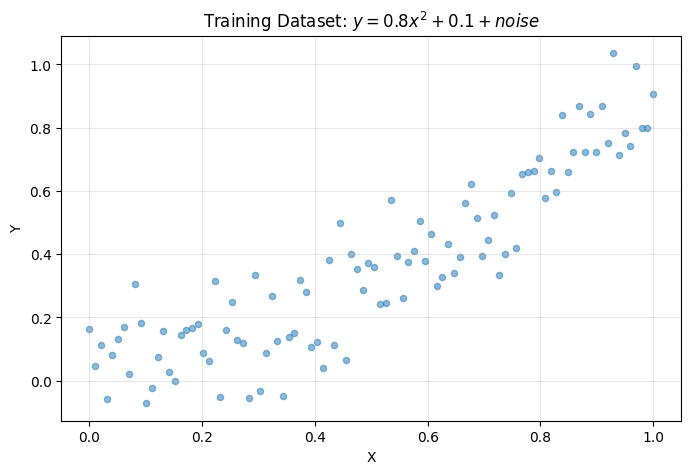
We’ll create a simple regression dataset: \(y = 0.8x^2 + 0.1 + \text{noise}\)
# Create dataset
X = jnp.linspace(0, 1, 100)[:, None]
Y = 0.8 * X ** 2 + 0.1 + brainstate.random.normal(0, 0.1, size=X.shape)


def dataset(batch_size):
    """Generate random batches from the dataset."""
    while True:
        idx = brainstate.random.choice(len(X), size=batch_size)
        yield X[idx], Y[idx]


# Visualize dataset
plt.figure(figsize=(8, 5))
plt.scatter(X, Y, alpha=0.5, s=20)
plt.xlabel('X')
plt.ylabel('Y')
plt.title('Training Dataset: $y = 0.8x^2 + 0.1 + noise$')
plt.grid(alpha=0.3)
plt.show()

print(f"Dataset created: {len(X)} samples")
Dataset created: 100 samples
Defining Training and Test Steps#
Now we’ll define JIT-compiled training and test functions using JAX transformations:
@jax.jit
def train_step(params, counts, batch):
    """Single training step with gradient descent."""
    x, y = batch

    def loss_fn(params):
        # Merge graph and compute loss
        model = brainstate.graph.treefy_merge(graphdef, params, counts)
        y_pred = model(x)
        new_counts = brainstate.graph.treefy_states(model, Count)
        loss = jnp.mean((y - y_pred) ** 2)
        return loss, new_counts

    # Compute gradients
    grad, counts = jax.grad(loss_fn, has_aux=True)(params)

    # Update parameters (simple SGD)
    params = jax.tree.map(lambda w, g: w - 0.1 * g, params, grad)

    return params, counts


@jax.jit
def test_step(params, counts, batch):
    """Evaluate model on test batch."""
    x, y = batch
    model = brainstate.graph.treefy_merge(graphdef, params, counts)
    y_pred = model(x)
    loss = jnp.mean((y - y_pred) ** 2)
    return {'loss': loss}


print("Training and test functions defined and JIT-compiled")
Training and test functions defined and JIT-compiled
Training the Model#
# Train the model
total_steps = 10_000
print(f"Training for {total_steps} steps...\n")

for step, batch in enumerate(dataset(32)):
    params_, counts_ = train_step(params_, counts_, batch)

    if step % 1000 == 0:
        logs = test_step(params_, counts_, (X, Y))
        print(f"Step {step:5d}: loss = {logs['loss']:.6f}")

    if step >= total_steps - 1:
        break

print("\nTraining complete!")
Training for 10000 steps...

Step     0: loss = 0.168351
Step  1000: loss = 0.011733
Step  2000: loss = 0.011768
Step  3000: loss = 0.011872
Step  4000: loss = 0.011736
Step  5000: loss = 0.011749
Step  6000: loss = 0.011963
Step  7000: loss = 0.011719
Step  8000: loss = 0.011735
Step  9000: loss = 0.011739

Training complete!
Verifying the Trained Model#
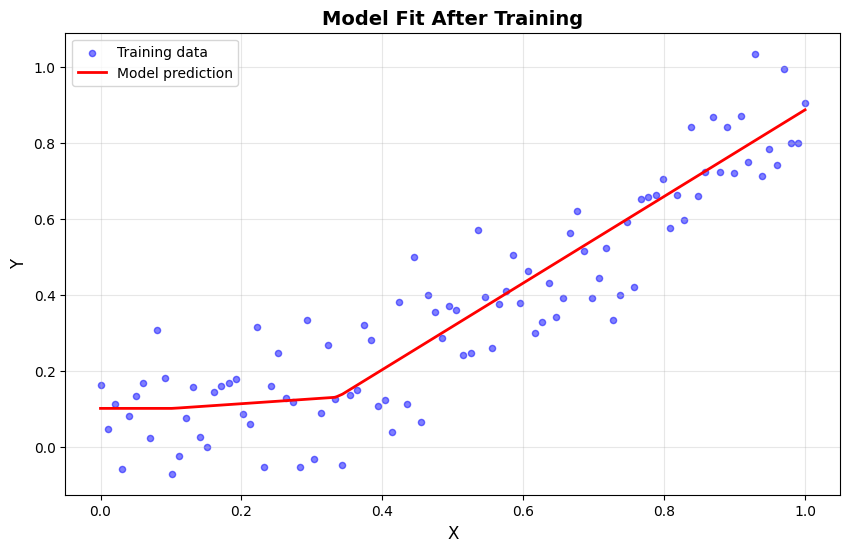
Let’s restore the model and check how many times it was called:
# Restore the trained model
model = brainstate.graph.treefy_merge(graphdef, params_, counts_)

print(f"Model called {model.count.value} times during training")
print(f"Expected: {total_steps} times\n")

# Make predictions
y_pred = model(X)

# Visualize results
plt.figure(figsize=(10, 6))
plt.scatter(X, Y, alpha=0.5, s=20, label='Training data', color='blue')
plt.plot(X, y_pred, color='red', linewidth=2, label='Model prediction')
plt.xlabel('X', fontsize=12)
plt.ylabel('Y', fontsize=12)
plt.title('Model Fit After Training', fontsize=14, fontweight='bold')
plt.legend()
plt.grid(alpha=0.3)
plt.show()

# Compute final test loss
final_loss = jnp.mean((Y - y_pred) ** 2)
print(f"Final MSE loss: {final_loss:.6f}")
Model called 10000 times during training
Expected: 10000 times
Final MSE loss: 0.011899
Advanced Graph Patterns#
Now let’s explore some advanced architectural patterns using the graph system.
Skip Connections (ResNet-style)#
class ResidualBlock(brainstate.graph.Node):
    """Residual block with skip connection."""

    def __init__(self, dim):
        super().__init__()
        self.linear1 = brainstate.nn.Linear(dim, dim)
        self.linear2 = brainstate.nn.Linear(dim, dim)

    def __call__(self, x):
        # Main path
        residual = x
        x = jax.nn.relu(self.linear1(x))
        x = self.linear2(x)

        # Skip connection
        return jax.nn.relu(x + residual)


class ResNet(brainstate.graph.Node):
    """Simple ResNet with multiple residual blocks."""

    def __init__(self, dim, n_blocks):
        super().__init__()
        self.blocks = [ResidualBlock(dim) for _ in range(n_blocks)]
        # Register blocks as attributes
        for i, block in enumerate(self.blocks):
            setattr(self, f'block_{i}', block)

    def __call__(self, x):
        for block in self.blocks:
            x = block(x)
        return x


# Test ResNet
resnet = ResNet(dim=10, n_blocks=3)
x = brainstate.random.randn(5, 10)
output = resnet(x)

print(f"ResNet Architecture:")
print(f"  Input shape: {x.shape}")
print(f"  Output shape: {output.shape}")
print(f"  Number of blocks: {len(resnet.blocks)}")

# Count parameters
params = brainstate.graph.states(resnet, brainstate.ParamState)
total_params = sum(jnp.size(p.value) for p in params.values() if hasattr(p.value, 'shape'))
print(f"  Total parameters: {total_params:,}")
ResNet Architecture:
  Input shape: (5, 10)
  Output shape: (5, 10)
  Number of blocks: 3
  Total parameters: 0
Multi-Path Networks (Inception-style)#
class InceptionBlock(brainstate.graph.Node):
    """Inception-style block with multiple parallel paths."""

    def __init__(self, in_dim, out_dim):
        super().__init__()
        # Path 1: 1x1 (direct projection)
        self.path1 = brainstate.nn.Linear(in_dim, out_dim // 4)

        # Path 2: 1x1 -> 3x3 (simulated with linear)
        self.path2_a = brainstate.nn.Linear(in_dim, out_dim // 4)
        self.path2_b = brainstate.nn.Linear(out_dim // 4, out_dim // 4)

        # Path 3: 1x1 -> 5x5 (simulated)
        self.path3_a = brainstate.nn.Linear(in_dim, out_dim // 4)
        self.path3_b = brainstate.nn.Linear(out_dim // 4, out_dim // 4)

        # Path 4: pool -> 1x1
        self.path4 = brainstate.nn.Linear(in_dim, out_dim // 4)

    def __call__(self, x):
        # Execute all paths in parallel
        out1 = jax.nn.relu(self.path1(x))

        out2 = jax.nn.relu(self.path2_a(x))
        out2 = jax.nn.relu(self.path2_b(out2))

        out3 = jax.nn.relu(self.path3_a(x))
        out3 = jax.nn.relu(self.path3_b(out3))

        out4 = jax.nn.relu(self.path4(x))

        # Concatenate outputs
        return jnp.concatenate([out1, out2, out3, out4], axis=-1)


# Test Inception block
inception = InceptionBlock(in_dim=16, out_dim=32)
x = brainstate.random.randn(4, 16)
output = inception(x)

print(f"Inception Block:")
print(f"  Input shape: {x.shape}")
print(f"  Output shape: {output.shape}")
print(f"  4 parallel paths with concatenated outputs")

# Count parameters
params = brainstate.graph.states(inception, brainstate.ParamState)
total_params = sum(jnp.size(p.value) for p in params.values() if hasattr(p.value, 'shape'))
print(f"  Total parameters: {total_params:,}")
Inception Block:
  Input shape: (4, 16)
  Output shape: (4, 32)
  4 parallel paths with concatenated outputs
  Total parameters: 0
Graph Analysis and Statistics#
Let’s create a utility function to analyze graph structures:
def analyze_graph(node):
    """Analyze computation graph statistics."""
    stats = {
        'total_nodes': 0,
        'total_params': 0,
        'param_tensors': 0,
        'node_types': {},
        'depth': 0
    }

    def traverse(n, depth=0):
        stats['total_nodes'] += 1
        stats['depth'] = max(stats['depth'], depth)

        # Count node type
        node_type = n.__class__.__name__
        stats['node_types'][node_type] = stats['node_types'].get(node_type, 0) + 1

        # Count parameters
        params = brainstate.graph.states(n, brainstate.ParamState)
        stats['param_tensors'] += len(params)
        for p in params.values():
            if hasattr(p.value, 'shape'):
                stats['total_params'] += jnp.size(p.value)

        # Traverse children
        for _, child in brainstate.graph.iter_node(n):
            if child is not n:
                traverse(child, depth + 1)

    traverse(node)
    return stats


# Analyze different models
models = {
    'MLP': MLP(),
    'ResNet': ResNet(dim=10, n_blocks=3),
    'Inception': InceptionBlock(in_dim=16, out_dim=32)
}

print("Graph Analysis Comparison:")
print("=" * 80)
print(f"{'Model':<15} {'Nodes':<8} {'Depth':<8} {'Param Tensors':<15} {'Total Params':<15}")
print("-" * 80)

for name, model in models.items():
    stats = analyze_graph(model)
    print(f"{name:<15} {stats['total_nodes']:<8} {stats['depth']:<8} "
          f"{stats['param_tensors']:<15} {stats['total_params']:<15,}")

print("\n" + "=" * 80)
Graph Analysis Comparison:
================================================================================
Model           Nodes    Depth    Param Tensors   Total Params
--------------------------------------------------------------------------------
MLP             4        1        6               0
ResNet          16       2        24              0
Inception       7        1        12              0

================================================================================
Summary#
PyGraph is a data structure specifically designed in the brainstate library to provide JAX function transformation support for complex graph structures. Its core value lies in:
1. Flexible Expression of Graph Structures#
Compared to traditional tree structures (pytree), graph structures can represent more complex node relationships and dependencies
Supports cyclic references, making it suitable for expressing complex model structures like RNNs
Nodes can contain arbitrary pytree array data or subgraph structures
2. Seamless Integration with the JAX Ecosystem#
Supports JAX’s core functionalities, including automatic differentiation, vectorization, and parallelization
Provides a mechanism for converting between graph structures and pytree via
treefy_splitandtreefy_mergeNatively supports JAX function transformations such as
jit,vmap, andgrad
3. Rich API for Graph Operations#
Structure operations:
graphdef,iter_node,iter_leaf,nodes,statesTransformations:
treefy_states,clone,treefy_split,treefy_merge,flatten,unflattenModifications:
pop_states,update_statesConversions:
graph_to_tree,tree_to_graph
4. Powerful Filter System#
Filter by type:
brainstate.ParamState,brainstate.ShortTermState, etc.Combine filters: Use tuples/lists for “any” logic
Match everything:
...orTrueMatch nothing:
NoneorFalse
5. Structure preserving state management#
Separate graph structure (
graphdef) from state values (treefy_states)Retrieve states according to state filters